

Introduction to Bit Planes
When you look at a digital image or think about how computers store visual data, it’s easy to imagine everything as smooth gradients and continuous tones. Under the hood, though, everything is broken down into binary—just 0s and 1s. One of the most insightful ways to understand this structure is through the concept of a bit plane. If you’ve never heard of it before, don’t worry—it’s one of those ideas that sounds technical at first but becomes surprisingly intuitive once you dig in.
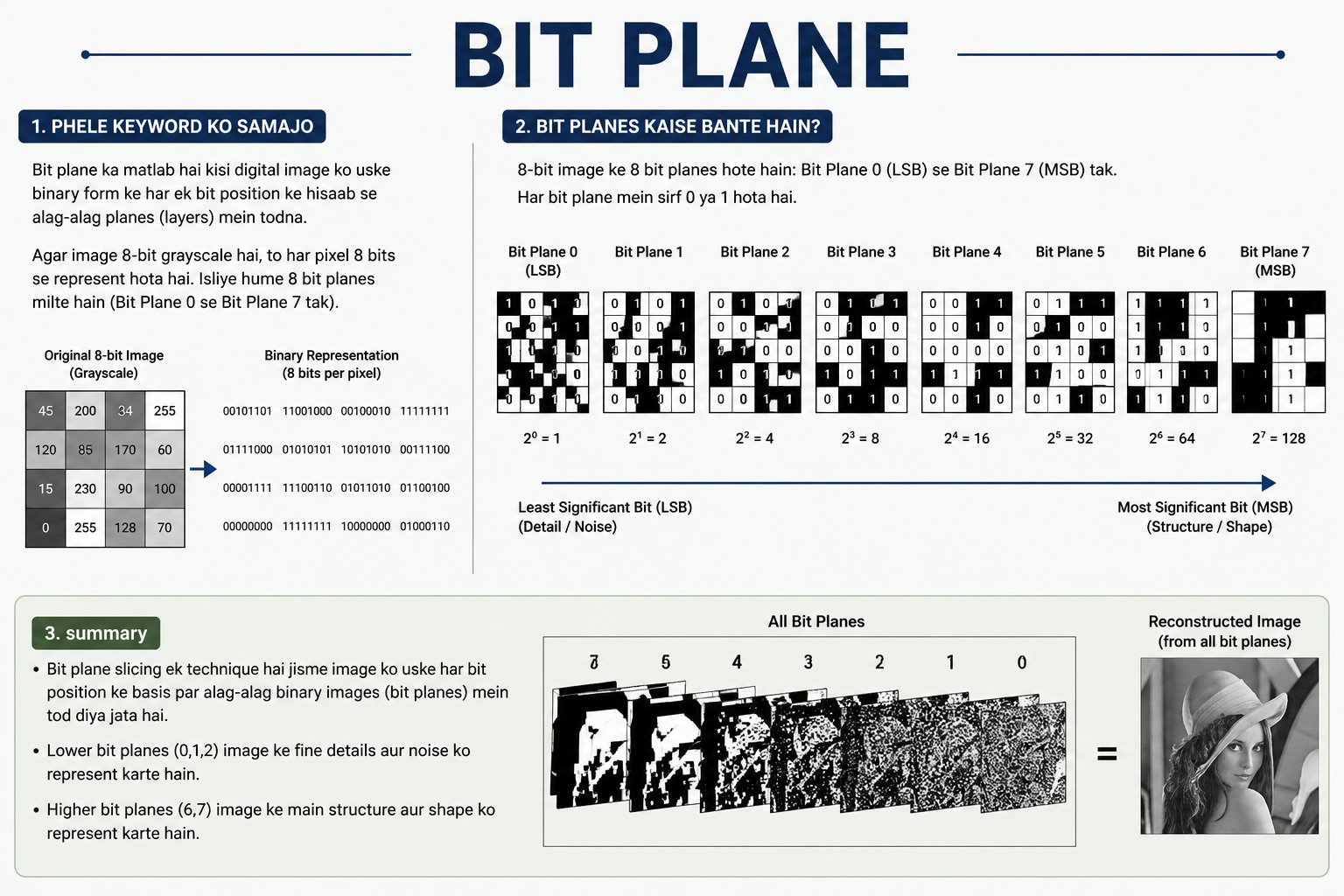
A bit plane refers to a single layer of bits within a digital image or dataset. In simple terms, imagine taking each pixel in an image and isolating just one specific bit from its binary representation. If you do this for every pixel, you end up with a new image made entirely of those extracted bits. That new image is a bit plane. Each plane corresponds to a specific bit position—like the least significant bit (LSB) or the most significant bit (MSB).
What makes bit planes particularly interesting is how much information they reveal about the structure and importance of data. Higher-order bit planes (those closer to the MSB) carry the bulk of the visual information, while lower-order ones often contain subtle details or even noise. This layered perspective is not just theoretical—it’s actively used in image processing, compression, watermarking, and even steganography.
Understanding the Binary Foundation of Images
Before diving deeper into bit planes, it’s important to understand how digital images are stored. Every image you see on a screen is composed of pixels, and each pixel has a value. In grayscale images, this value typically ranges from 0 to 255, representing different shades from black to white. In color images, each pixel usually has three components—red, green, and blue—each also ranging from 0 to 255.
These values are stored in binary form. For example, the decimal number 150 is represented as 10010110 in binary. Each digit in this binary number is a bit, and each bit has a position. The rightmost bit is the least significant, while the leftmost is the most significant. This positional structure is exactly what allows us to separate an image into bit planes.
When you extract a bit plane, you are essentially selecting one bit position across all pixels. If you extract the 7th bit (counting from 0), you’re pulling out the most significant bit from every pixel. This results in a binary image where each pixel is either 0 or 1, depending on whether that specific bit was set.
This binary foundation is what makes bit-plane slicing possible. It’s not just a neat trick—it’s a direct consequence of how digital systems represent data. Once you understand this, the rest of the concept starts to fall into place naturally.
What Is Bit-Plane Slicing?
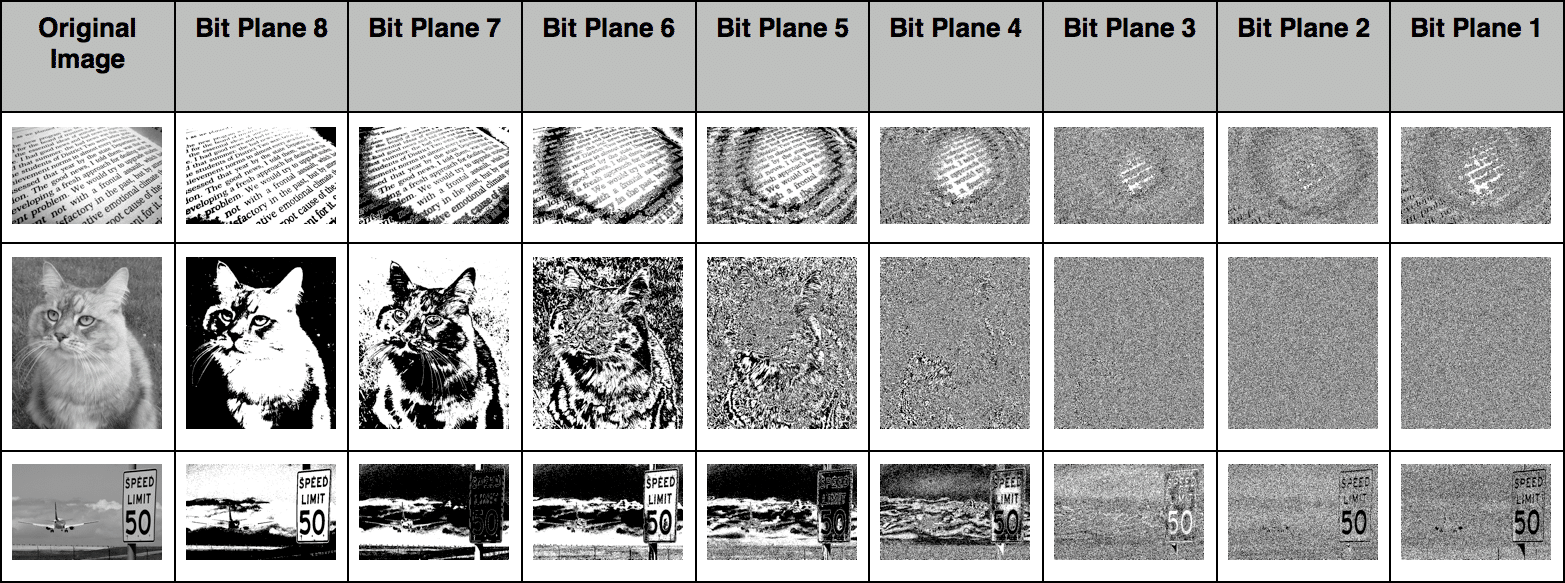
Bit-plane slicing is the process of decomposing an image into its constituent bit plane. If an image uses 8 bits per pixel (which is standard for grayscale), then it can be broken down into 8 separate bit planes. Each plane represents a specific bit position across all pixels.
The result of bit-plane slicing is a set of binary images. The first plane (bit 0) contains the least significant bits, while the last plane (bit 7) contains the most significant bits. These planes can be visualized individually, and each one reveals a different level of detail about the original image.
What’s fascinating is how these planes differ in importance. The higher-order planes tend to preserve the main structure of the image—shapes, edges, and major contrasts. Lower-order planes, on the other hand, often appear noisy or contain fine details that are not immediately noticeable in the original image.
This technique is widely used in image processing because it allows for selective manipulation. For example, you can enhance or suppress certain bit planes to improve image quality or reduce noise. It also plays a key role in data hiding techniques, where information is embedded in the less noticeable lower bit planes.
Importance of Different Bit Planes
Not all bit planes are created equal. In fact, their significance varies dramatically depending on their position. The most significant bit (MSB) has the highest impact on the pixel’s value, while the least significant bit (LSB) has the smallest.
To put this into perspective, consider an 8-bit pixel. The MSB contributes a value of 128, while the LSB contributes just 1. This means that changing the MSB drastically alters the pixel’s intensity, while changing the LSB results in only a minor adjustment.
Because of this, higher-order bit planes carry the bulk of the visual information. If you reconstruct an image using only the top few bit planes, you’ll still get a recognizable version of the original. On the other hand, if you use only the lower bit planes, the result will look more like random noise.
This difference in importance is what makes bit planes so useful in applications like compression and watermarking. By focusing on the most significant planes, you can reduce data size without losing too much visual quality. Meanwhile, the less significant planes can be used to store hidden data without noticeably affecting the image.
Applications of Bit Planes in Image Processing
Bit planes are not just a theoretical concept—they have practical applications in several areas of image processing. One of the most common uses is image enhancement. By analyzing individual bit planes, you can identify which layers contribute most to the image’s clarity and adjust them accordingly.
Another important application is image compression. Since higher-order bit planes contain most of the essential information, some compression techniques prioritize these planes while discarding or simplifying the lower ones. This allows for efficient storage without a significant loss in quality.
Bit planes are also used in noise reduction. Lower-order planes often contain random variations that can be interpreted as noise. By filtering or removing these planes, you can produce a cleaner image. However, this must be done carefully, as it can also remove fine details.
In medical imaging, satellite imagery, and other high-precision fields, bit-plane analysis helps in isolating specific features. For example, subtle variations in intensity can be highlighted by examining certain bit planes, making it easier to detect anomalies or patterns.
Bit Planes in Steganography and Data Hiding
One of the more intriguing uses of bit planes is in steganography—the art of hiding information within other data. Because the least significant bit has minimal impact on the overall image, it’s an ideal place to embed hidden messages.
In a typical steganography technique, the LSB of each pixel is replaced with bits from a secret message. Since the change is so small, it’s usually imperceptible to the human eye. Yet, the hidden data can be extracted later by someone who knows where to look.
Bit-plane manipulation allows for more advanced data hiding techniques as well. Instead of using just the LSB, multiple lower-order planes can be used to increase the capacity of hidden data. However, this comes at the cost of increased visibility, so there’s always a trade-off.
This approach is widely used in digital watermarking, where ownership information is embedded into images. It’s also used in secure communication, where sensitive data needs to be transmitted without drawing attention.
Bit Planes in Color Images
So far, we’ve mostly talked about grayscale images, but bit planes are just as relevant in color images. In fact, they become even more interesting when you consider that each color channel—red, green, and blue—has its own set of bit planes.
For a standard 24-bit color image, each pixel consists of three 8-bit values. This means there are 24 bit planes in total—8 for each color channel. Each of these planes can be analyzed or manipulated independently.
This opens up a wide range of possibilities. For example, you can modify the bit planes of just the blue channel to embed hidden data, leaving the red and green channels untouched. Since the human eye is less sensitive to changes in blue, this can be an effective strategy for steganography.
Bit-plane analysis in color images also helps in tasks like color balancing and feature extraction. By examining how different bit planes contribute to each channel, you can gain deeper insights into the image’s composition.
Reconstruction of Images from Bit Planes
One of the most powerful aspects of bit-plane representation is that it’s reversible. You can take all the individual bit planes and recombine them to reconstruct the original image. This process involves assigning each bit plane its corresponding weight and summing them up.
For example, in an 8-bit image, the 0th plane is multiplied by 1, the 1st plane by 2, the 2nd by 4, and so on, up to 128 for the 7th plane. When all these weighted planes are added together, you get the original pixel values.
What’s interesting is that you don’t always need all the planes to reconstruct a usable image. Even using just the top 4 or 5 planes can produce a recognizable result. This is why bit-plane slicing is so useful in compression and progressive image transmission.
This reconstruction capability also highlights how redundant some parts of an image can be. By selectively choosing which planes to include, you can control the balance between quality and data size.
Advantages and Limitations of Bit-Plane Techniques
Bit-plane analysis offers several advantages. It provides a clear and structured way to understand how image data is distributed. It also enables targeted manipulation, allowing you to focus on specific layers of information.
Another advantage is its versatility. Bit-plane techniques can be applied to a wide range of tasks, from compression and enhancement to data hiding and feature extraction. The concept is simple, yet its applications are broad and impactful.
However, there are limitations as well. Working with bit planes can increase computational complexity, especially for large images or real-time applications. Additionally, modifying certain planes can lead to unintended artifacts if not done carefully.
There’s also the issue of trade-offs. For example, using more bit planes for data hiding increases capacity but also raises the risk of detection. Similarly, removing lower planes can reduce noise but may also eliminate important details.
Conclusion
Bit planes offer a fascinating window into the inner workings of digital images. By breaking down pixel values into individual bits, they reveal how information is layered and distributed. This perspective not only deepens your understanding of image representation but also opens the door to a wide range of practical applications.
From image processing and compression to steganography and data analysis, bit-plane techniques are both powerful and versatile. They allow for precise control over how data is manipulated, making them an essential tool in many fields.
What makes bit planes particularly compelling is their balance of simplicity and depth. The concept itself is straightforward, yet its implications are far-reaching. Once you start thinking in terms of bit planes, you begin to see digital data in a completely different light—and that’s where the real value lies.